

Sep 2026
Therapy Booking: Internal Appointment Booking for AAWA
Designed, built, and piloted a full-stack web app that books client therapy sessions straight into therapists' own Outlook calendars, with Microsoft 365 sign-in, recurring series, and server-enforced availability rules.
- Web Development & Digital Platforms
- Microsoft 365 & Cloud Administration
- Business Applications & CRM
- AI & Intelligent Systems
- React
- TypeScript
- Node.js
- SQL Server
- Microsoft Graph
- Microsoft Entra ID
- Playwright
- Claude Code
The brief
Advisors at the Autism Association of Western Australia book therapy sessions into therapists’ Outlook calendars. Microsoft Bookings couldn’t create recurring client appointments and didn’t fit the organisation’s booking rules, and Power Apps would have needed Premium licences plus custom code for the hard parts. As part of the Application Team, I designed, developed, and piloted an internal booking app to close that gap.
The approach
A web app that books client appointments directly into each therapist’s own Outlook calendar. Before it offers a time, it checks working hours, Outlook busy time, staff time off, and WA public holidays; it prevents double bookings; and it keeps client data in the organisation’s own database.
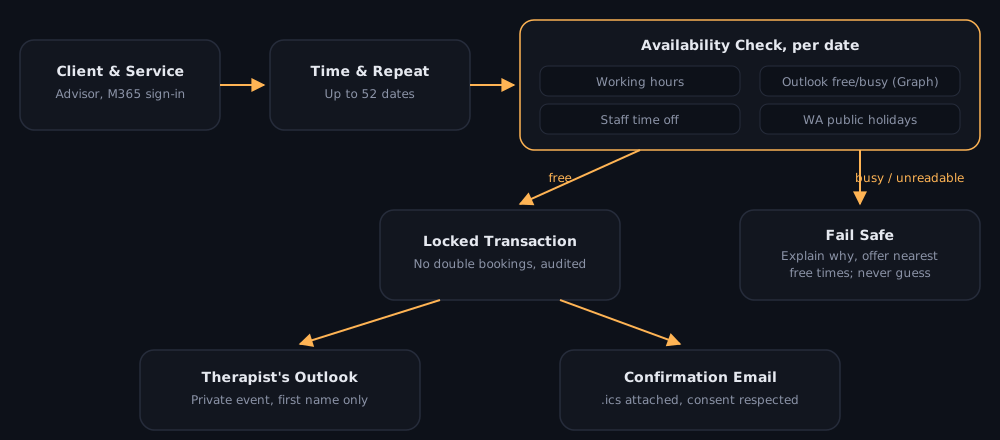
The app in pilot
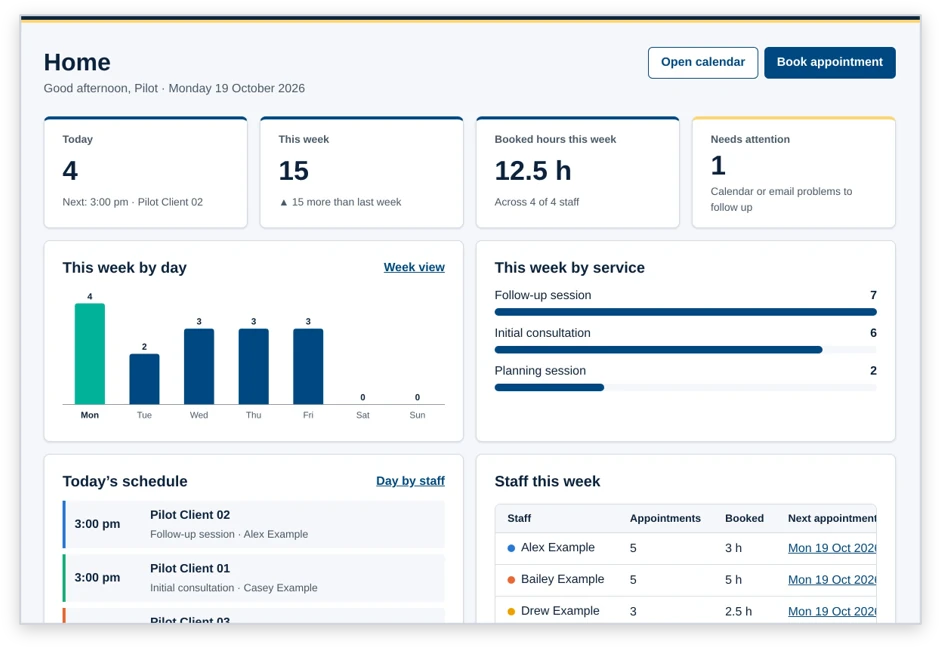
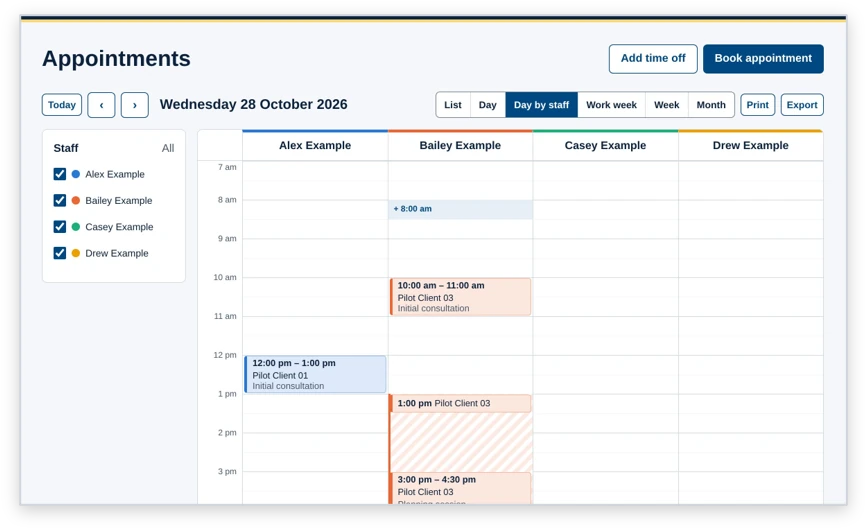
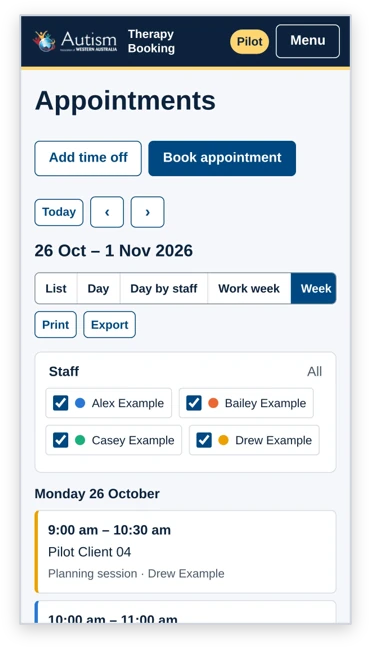
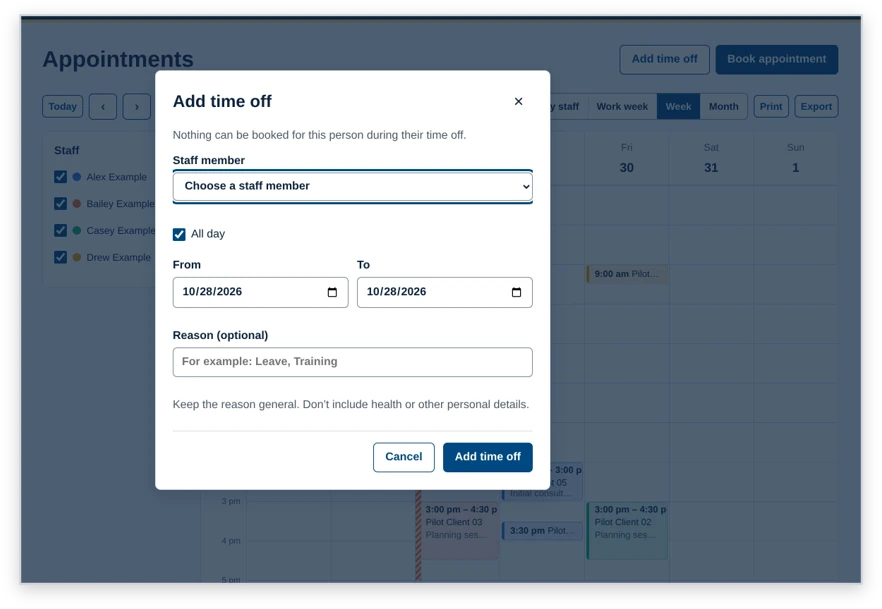
Screenshots from the pilot — all client and staff names are made-up test data.
Key features
- Four-step booking — client and service → time → repeat → review, with a live summary.
- Recurring series — weekly, fortnightly, or monthly, up to 52 dates, each checked individually.
- Team calendar in six views (List, Day, Day by staff, Work week, Week, Month) with a colour per staff member, drag-and-drop rescheduling with preview and confirmation, click-an-empty-slot booking, and print and CSV export.
- Smart booking from the calendar — if a clicked time isn’t free, the app explains why and offers the nearest free times.
- Staff time off that blocks booking just like Outlook busy time.
- Home dashboard with stat tiles, charts by day and by service, today’s schedule, and a staff table.
- Appointment record with status badges, the whole series, a full change history, and change/cancel actions.
- Read-only “My appointments” calendar for therapists.
- Admin settings — staff, working hours and booking readiness; a staff × services assignment grid; services, clients, users and roles; WA public holiday import; email templates with live preview; email settings with an outbox/log; and a “Needs attention” queue for Outlook failures with Retry.
- Responsive and accessible (WCAG 2.2 AA) — works on phones, keyboard and screen-reader friendly, and follows the organisation’s brand guidelines.
Technology stack
| Layer | Technologies | Role |
|---|---|---|
| Front end | React 18, TypeScript, Vite, CSS design tokens | Single-page app with its own lightweight router — every screen has an address |
| Back end | Node.js 24, Express, TypeScript | API with role checks and validation; serves the web app |
| Domain logic | Separate TypeScript package, luxon | Perth time zone, recurrence, availability, and conflict rules — no I/O, fully tested |
| Data | SQL Server (production), SQLite (pilot), in-memory (demos) | Three swappable data layers behind one interface; plain SQL migrations |
| Microsoft 365 | MSAL Node, Microsoft Graph | Single sign-on, Outlook free/busy, calendar events, email |
| Quality | zod, Vitest, supertest, ESLint, Playwright | Input validation, 173 automated tests, linting, browser checks |
| Structure | npm workspaces monorepo | Web app, API, and core domain package |
Microsoft Entra ID and single sign-on
- Registered a single-tenant app in Microsoft Entra ID with a Web platform, redirect and post-logout URIs, and a client secret kept in server-side configuration — never in source control.
- Granted delegated Microsoft Graph permissions (
openid,profile,email,offline_access,User.Read,User.ReadBasic.All,Calendars.ReadWrite,Calendars.ReadWrite.Shared) with organisation-wide admin consent. - Implemented the authorization code flow with PKCE through MSAL Node and a server-side session. The session cookie is signed, httpOnly, and SameSite, and state-changing requests have their Origin checked. Tokens stay on the server — never sent to the browser or written to logs.
- Swappable sign-in: a localhost-only test-user picker for demos, and Microsoft sign-in for the pilot.
- Learnt to diagnose Entra sign-in errors —
AADSTS65001(consent pending) andAADSTS50105(user not assigned to the app).
Users, roles, and calendar access
- Three roles — Admin, Scheduler (advisors), and Staff (therapists) — enforced on the server for every request.
- Users are created automatically on first sign-in; nominated pilot admins become Admin, and everyone else starts as Staff until an Admin changes their role.
- Pilot: Outlook delegate access (Editor, including private items).
- Planned for go-live: Graph application permissions scoped to an IT-managed security group of bookable staff via Exchange Online RBAC for Applications, so staff never have to share calendars.
- Three delivery modes — an in-app outbox only, sent as the signed-in user via Graph, or sent from a shared mailbox with app-only credentials — plus a safety redirect that routes all test mail to one inbox.
- Confirmation, change, cancellation, and reminder emails with
.icscalendar attachments and configurable reminder timing. - Admin-editable templates with live preview, sanitised to block unsafe HTML.
- Client email consent is respected: no consent, no email.
Security and privacy
- Booking rules are enforced on the server; nobody gets direct database access.
- Every query is parameterised and every input validated.
- Double bookings are prevented with a locked database transaction.
- Fails safe — if Outlook can’t be read, no times are offered.
- Outlook events show only the client’s first name, the service, and a reference, and are marked Private (configurable).
- A full audit history of who booked, changed, or cancelled.
Problems I solved
- Outlook “access denied” despite a passing access check. Added logging of Microsoft’s error codes, traced the failure to Exchange refusing private events from delegates, and fixed it by having the staff member allow the delegate to see private items — plus a setting to turn private events off.
- Time off made the whole calendar look unavailable. Fixed how time off was merged with Outlook busy time and added a regression test.
- Assigning services was slow, one staff member at a time. Replaced it with a single staff × services grid that saves all changes at once.
Engineering practices
- 25 architecture decision records explaining key choices, plus change summaries and future-phase plans.
- An AI-agent-ready repository — project instructions, agent rules, and a brand/UI skill — so AI coding assistants follow the project’s conventions.
- Brand-compliant UI checked at phone and laptop widths, and a pilot presentation built on the corporate PowerPoint template.
Developed with AI-assisted coding (Claude Code), with all design decisions, testing, and Microsoft 365 configuration directed by me.
Outcome
The pilot is running with real Microsoft 365 sign-in and staff Outlook calendars, and the go-live roadmap has been approved for presentation. Next steps on that roadmap:
- IT-managed calendar access — app permissions limited to one security group.
- Client data from Salesforce — a nightly sync from the Microsoft Fabric data warehouse.
- Microsoft 365 Copilot agent — advisors book by asking in Teams or Outlook, with the app still enforcing every rule.
- Hosting — Azure App Service with Azure SQL Database in Australia East, estimated at about AUD 30–35 a month.