

May 2026
SitePause: WordPress Maintenance Mode Plugin
Built SitePause, a lightweight WordPress maintenance plugin that keeps administrators working while visitors see a branded offline page — with scheduling, protected previews, role and IP bypass, five design presets and validated settings import/export.
- Web Development & Digital Platforms
- WordPress
- PHP
- JavaScript
- CSS
- HTML
- WordPress Settings API
- LocalWP
- Git
- GitHub
The brief
Site owners, freelancers and small agencies often need to take a WordPress site offline while they work on it — without visitors seeing half-finished pages or broken layouts, and without locking themselves out. I built SitePause as a hands-on way to learn WordPress plugin development properly, and it’s now the maintenance tool I use for WiTEDS development work.
The requirements were to:
- Let administrators switch maintenance mode on while still using the site normally.
- Show visitors a clear, customisable offline page.
- Use standard WordPress APIs only — no framework, no paid licensing.
- Protect settings, preview access and everything shown to visitors.
- Build it in controlled phases, from a plugin skeleton to a full 1.0.
The approach
I planned the plugin before writing code, then grew it from a skeleton into version 1.0.0, adding scheduling, design presets, access controls and settings portability along the way.
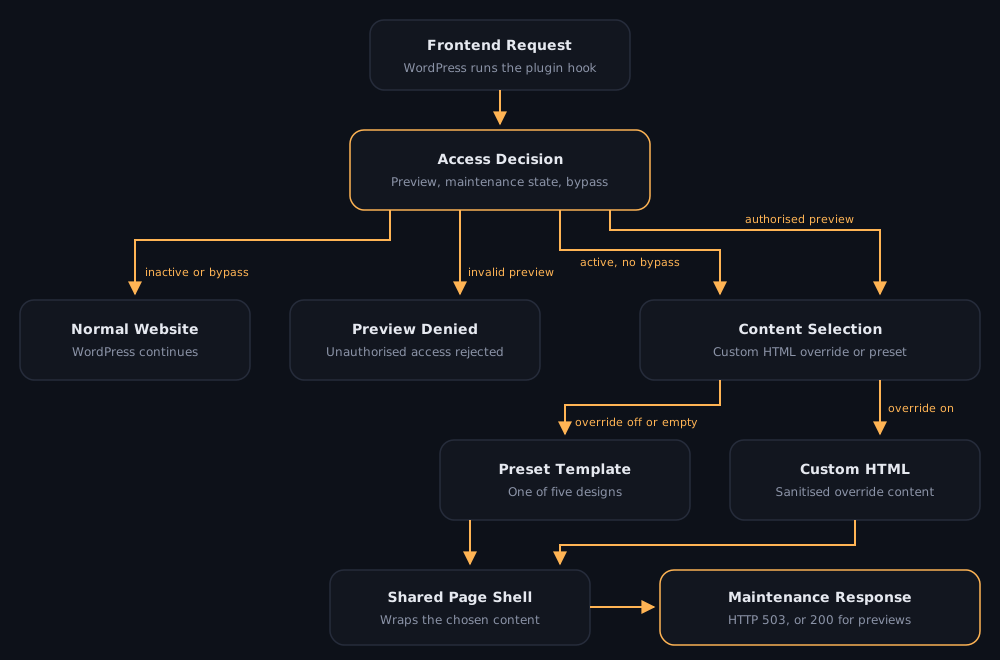
How it works
- One access decision per request — the frontend hook checks for a protected preview first, then whether maintenance is on manually or the current time falls inside a scheduled window.
- Bypass rules — administrators, selected logged-in roles and exact trusted IP addresses see the normal site; login, admin and WordPress system requests are never blocked.
- Content selection — either one of five presets or a custom HTML override, with automatic fallback to the preset when the override is disabled or empty.
- Correct responses — visitors get HTTP 503 with retry guidance and no-cache headers, so search engines treat the outage as temporary; authorised previews return 200.
Key features
- Manual or scheduled maintenance, using the site’s own timezone.
- Five presets — Classic, Center Card, Minimal, Bold Panel and Split Screen.
- Branding — editable text, logo, colours, layout width, contact details and social links.
- Countdown for visitors that never switches maintenance off by itself.
- Custom HTML override in its own tab, with clear warnings about what it replaces.
- Protected preview, role and IP bypass, and a “Maintenance Mode ON” indicator in the admin bar.
- Settings import/export as JSON, plus a reset that only takes effect once saved.
Security and privacy
- Capability checks and nonces on every admin action; inputs sanitised and output escaped.
- Custom HTML runs through WordPress’s HTML sanitiser on save and on render.
- Imports accept only recognised settings and pass them through the same sanitiser.
- IP bypass uses the server-reported connection address, not spoofable forwarded headers.
- Deactivating keeps settings; uninstalling removes them cleanly.
Problems I solved
- Duplicate “settings saved” notices. WordPress and the plugin were both showing a success notice. I changed the save redirect so the plugin uses its own flag and only one notice appears.
- Custom HTML vs preset content. I made the override an exclusive choice with a preset fallback, then moved it into a dedicated tab with warnings about which built-in content it hides.
- Reset that felt destructive. Reset now asks for confirmation and only clears the form in the browser — nothing changes until Save Settings.
- Invalid schedules. I added required dates, start-before-end checks and timezone-aware parsing in both the browser and on the server; invalid schedules are disabled with a clear error.
Engineering practices
- Written scope, architecture, decisions, roadmap and a manual testing checklist.
- Framework-free code with small classes for hook registration, and each preset in its own template file.
- Built up over 19 commits, from planning and the skeleton to the full 1.0 feature set.
Outcome
Version 1.0.0 is complete — maintenance rendering, scheduling, bypass rules, protected previews, five presets across seven settings tabs, and settings transfer.
I submitted SitePause to the WordPress.org plugin directory. It wasn’t accepted because the directory already has many maintenance plugins, so I use it internally for WiTEDS development work.
Next: theme and caching compatibility checks, and keeping the project documentation in step with the 1.0 feature set.