

Jul 2026
PPM Express to Word Proposal Generator
An end-to-end Power Automate solution that turns PPM Express intake data into a fully populated Word proposal document, replacing manual transcription with a one-click, self-service tool.
- Workflow Automation & Process Improvement
- Microsoft 365 & Cloud Administration
- Web Development & Digital Platforms
- Power Automate
- PPM Express
- SharePoint
- HTML/JavaScript
- Word Content Controls
The brief
PMO proposal documents were being built by manually transcribing intake data out of PPM Express into Word — slow and error-prone every time a new Idea moved into the proposal stage.
The approach
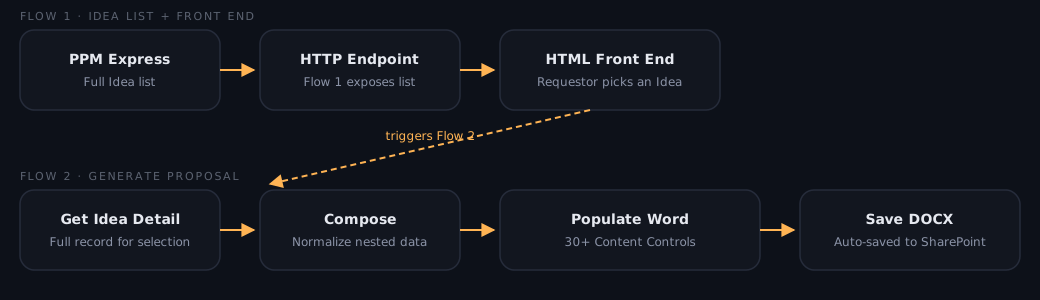
Built a two-flow Power Automate pipeline: the first pulls the full Idea list from the PMO Challenge in PPM Express and exposes it through an HTTP-triggered endpoint; the second retrieves full detail for a selected Idea, normalising PPM Express’s nested output with a Compose action. A lightweight HTML front end lets a requestor pick an Idea from a dropdown and trigger generation. On the document side, a Word template with 30+ Content Controls (Project Name, Business Problem, Objective, Benefits, Risks, Dependencies, Budget) is populated directly from the flow, including a join() expression to render a multi-choice field as readable text, then saved as a DOCX into SharePoint automatically. Along the way, resolved a front-end JSON parsing error by adding a proper HTTP Response action — the flow was completing successfully server-side, but the browser had nothing to parse.
Outcome
A requestor can now generate a fully populated PMO proposal document straight from PPM Express data in a few clicks, with the whole pipeline — Ideas list → selection → data retrieval → populated DOCX → SharePoint — running end-to-end. Currently in active use, with PDF conversion, direct download links, and an auto-generated executive summary among the next enhancements queued.