

Oct 2026
Home Server for Apps and Development
Built and run a personal Linux homelab for containerised apps, network storage and remote development — with private VPN access, hardened static hosting, verified backups and read-only AI diagnostics.
- Networking & Infrastructure
- AI & Intelligent Systems
- Linux (Ubuntu Server)
- Docker
- Nginx
- WireGuard VPN
- SSH
- Secure web tunnel
- Network storage (SMB)
- Python
- Model Context Protocol
- Codex CLI
The brief
A personal infrastructure project, built in stages from March to October 2026. I wanted one central place to run my own applications and development projects, reachable from my laptop, desktop or a browser. My existing setup already had network storage and a Raspberry Pi running media and file services, so the plan was to add a mini PC server for applications and development while the NAS stayed the storage layer.
The requirements were to:
- Run applications on the server without disrupting existing services.
- Integrate network storage for shared files and selected backups.
- Reach the development workspace from macOS, Windows and a browser.
- Keep remote access private — VPN and SSH first, then a browser-based editor tunnel.
- Host static websites in their own isolated container.
- Inspect server health through monitoring and read-only AI tooling.
The approach
A Linux server running everything in containers, with network storage mounted for files and backups, and separate paths for private development access and the few web apps that need to be reachable. I used existing open-source software for the applications and focused my work on deployment, integration, security and troubleshooting.
The hardware
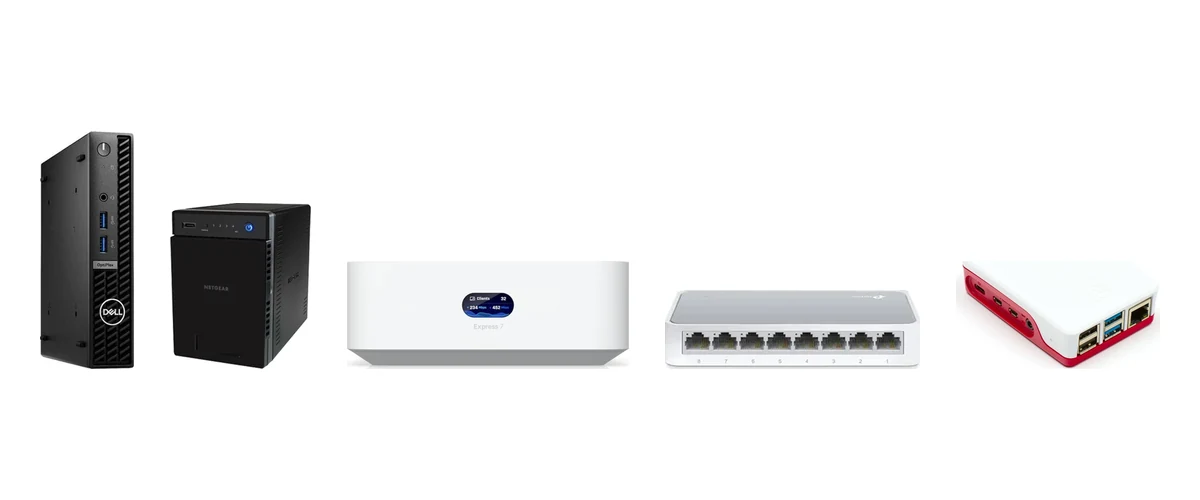
- Mini PC server — a small-form-factor desktop running Linux; hosts the containers and the development workspace.
- Four-bay NAS — shared files, media and backup archives.
- Router/gateway — the network edge and the VPN endpoint for remote access.
- Eight-port switch — wired connections between the server, NAS and Raspberry Pi.
- Raspberry Pi — the original home for media and file services.
How it works
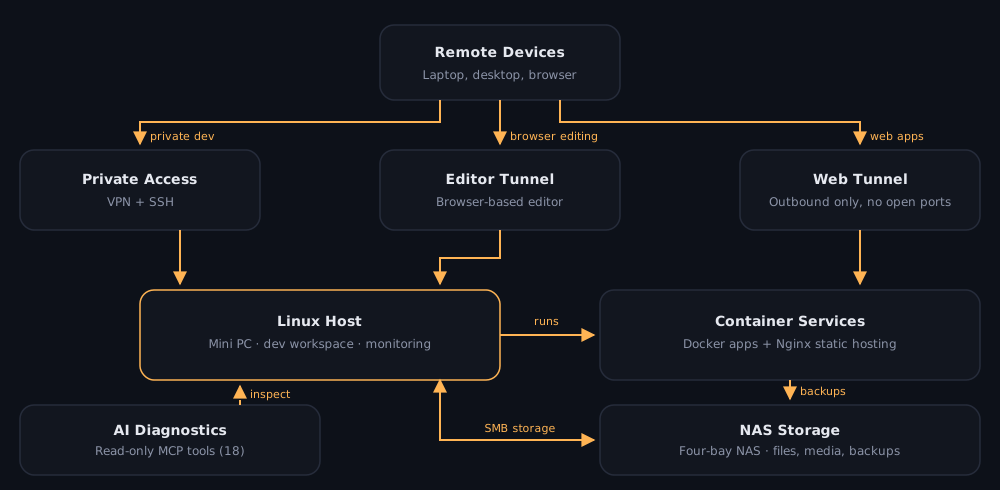
- Apps in containers — Docker and Docker Compose with a self-hosted deployment dashboard. Services include invoicing, file sync and network-wide DNS filtering, each with its own database.
- Storage — the NAS is mounted over SMB for shared files, media and backup archives.
- Private access — a WireGuard VPN on the gateway plus SSH for development, later joined by an editor tunnel for browser-based editing.
- Public web apps — only selected applications are published, through an outbound secure tunnel rather than open inbound ports.
- Static hosting — a dedicated Nginx container serving a read-only content mount.
- Monitoring and AI diagnostics — a monitoring dashboard for health, plus a Python MCP server that gives Codex CLI 18 read-only tools for inspecting the server, containers and storage.
Security choices
- Remote development stays behind the VPN and SSH; adding it changed no public exposure, firewall rules or VPN routing.
- No inbound ports are opened for web apps — selected services go out through a secure tunnel.
- Static hosting is locked down: read-only content, GET and HEAD only, directory listings off and hidden files blocked.
- The AI integration is read-only by design — it can inspect, not change.
- Inspect first, change second: I checked running services and port use before every addition, and re-verified existing services afterwards.
- Hostnames, addresses and configuration details are deliberately left out of this write-up.
Problems I solved
- The deployment dashboard wouldn’t restart. A required configuration file path had become a directory, with wrong permissions and ownership. I recreated the file and corrected permissions, and its services came back healthy.
- The system disk hit 100%. Docker couldn’t even run a command. About 25 GB of local backup archives plus old system journals had filled the OS disk. I vacuumed old journals (about 3.5 GB back immediately) and relocated the backups.
- Old workloads were eating storage. After checking dependencies, I removed retired containers and old AI-experiment volumes — one cleanup took volume usage from 8.81 GB to 1.22 GB.
- DNS filtering worked but its dashboard was down. Container logs showed certificate parsing and SSL errors from an empty certificate file. Regenerating the certificate restored the web interface.
- VPN clients couldn’t use filtered DNS. The DNS filter’s listening mode was rejecting the VPN subnet. Allowing those clients gave remote devices filtered DNS over mobile data.
- The web server wouldn’t start for the invoicing app. A host directory was being bind-mounted where a config file was expected. After correcting the mount, the service returned HTTP 200.
- A failing data disk. Directory scans stalled and filesystem errors built up. Kernel logs and SMART data showed filesystem corruption and 16 pending sectors — despite an overall SMART “pass”. I stopped broad scans to avoid further damage and planned a replacement rather than trusting the drive.
Engineering practices
- Phased plans, with inspection before changes and health checks after maintenance.
- Container inventories, filesystem and SMART diagnostics, and local HTTP checks to confirm what’s actually running.
- Backup verification: archive integrity checks and recorded checksums, not just “the job ran”.
Built with AI assistance — ChatGPT for planning and troubleshooting, and Codex CLI for guided execution and the MCP integration — with every change decided and verified by me.
Outcome
A working personal platform for applications, storage and remote development:
- Static hosting verified — main and test pages return 200, a missing page 404, and a hidden-file request 403; the existing invoicing app still returned 200 afterwards.
- Backups checked — the invoicing stack backed up as a database dump, configuration archive and four volume archives, each integrity-checked.
- 18 read-only MCP tools passing compile checks and live smoke tests.
- Storage reclaimed — about 7.6 GB from one container-volume cleanup and 3.5 GB from old journals.
- Remote development working over the VPN and from a browser through the editor tunnel.
Next: replace the failing data disk and harden boot behaviour after power cuts, run a full backup restore test, add failure alerts, and trial local AI models.